KraftedX Practical Assignment
⚠️ Disclaimer: Read this or lose a great candidature!
Hi! This is Kartik Bindra 👋🏻
A little about me, I'm a dedicated software engineer skilled in Full-Stack development, Blockchain development, and UI/UX Design, focused on building impactful and scalable solutions. I thrive in dynamic environments where I can apply my skills in coding, problem-solving, and design to build impactful projects. More about me here: Check out my Portfolio
Task Submission
Now, Lets talk about the Task Submission (’cause that is what you are here for anyways!)
So I will go through the approach I took to implement the asked functionalities, what I learnt along the way in contrast to what I already knew and the deeper understanding of all the things (& how they work under the hood). Here I go!
🔐 Next.js Authentication using JWT
Instead of going the easy route with third-party libraries (like Auth.js), I decided to build the auth logic from scratch using JWT (JSON Web Tokens). Why? Because understanding how things actually work is chef’s kiss for any real dev. 🤌🏻
What I Already Knew
- JWT-based auth in a React + Express.js Setup
- Access Token (Client Side Token) & Refresh Token (Server Side Token) in JWT Authentication
- Zod Form data validation
- Connecting serverless databases like NeonDB
What I Learned
- JImplementing JWT with the
joselibrary in a Next.js app - Creating custom middlewares for auth logic
- Realizing that Access Tokens aren’t necessary in a full Next.js setup (since it handles both client & server)
useActionState()hook
Architecture
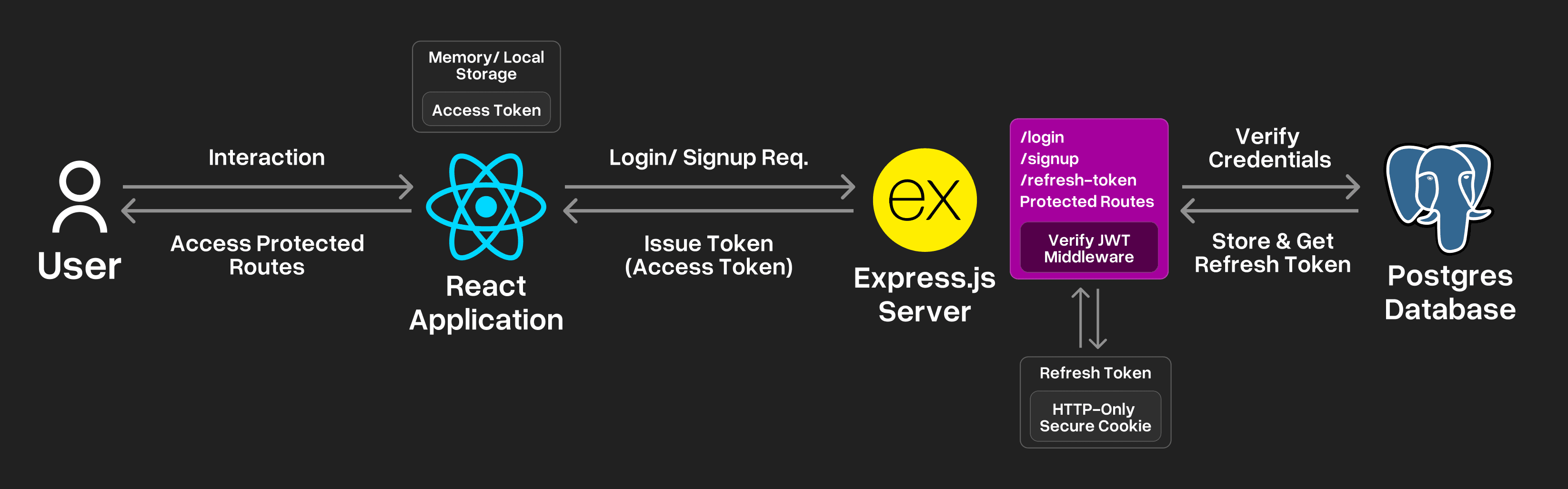
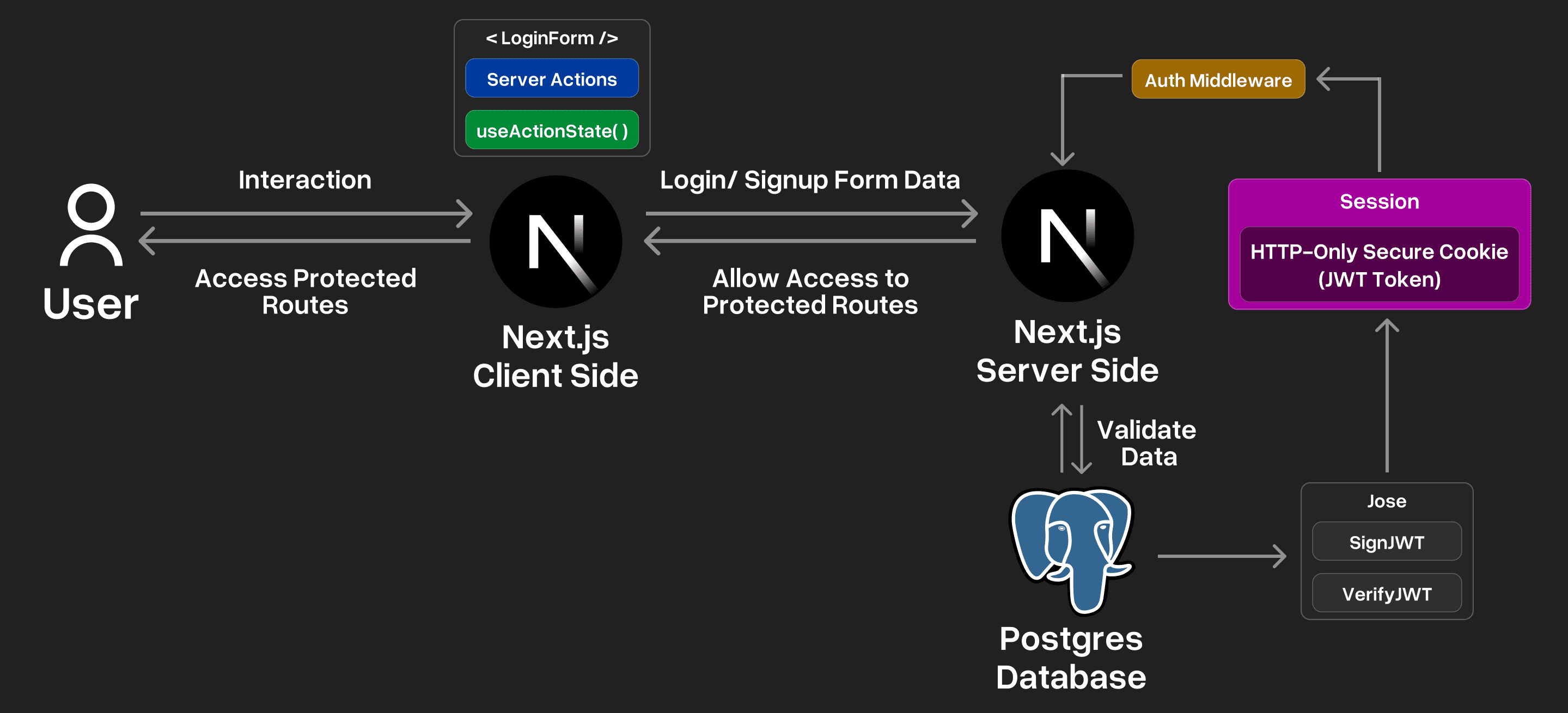
I would like to explain the 2 different approaches for authentication with JWT. One that used React with a Express.js Server and the other using Next.js Client and Server Actions. Lets see both of them:
React + Server Based Authentication with JWT
Next.js Authentication with JWT (Server Actions + Middleware)
Look at the designs of Auth pages & workflows here: Figma File
🎨 Blob Gradient Dynamic Background
Reverse engineering this gradient was hell of a task to be completed. What helped me the most was the browser inspect tbh 👀
What I Observed
The kraftedX.com website had 6 Blobs/circles/divs that were moving around the whole background space with different animations applied to them: Circular Rotation Animation, Horizontal & Vertical Animations. Each blob had a gradient applied to it. Every blob had a functionality that helped them “gravitate” towards the cursor whenever they were close to it. (or maybe vice versa, the cursor blob was getting gravitated towards the blobs whenever they were close enough!)
What I Built
Would love to work "gravitate" feature too, but had to leave it due to upcoming end-semester examination pressure, IYKYK! 🥲
Want to see the animations in action? Visit the Home and interact with the background there. Hope you like it!
Remember to Login first, or else you would not be able to access the Home page!
Thanks for checking out my submission. Hope it gave you a peek into how I approach problems and build solutions that are equal parts functional and delightful.
Thanks for reading, hope you enjoyed the walkthrough
Signing off,
Chao chao! ✌️